Config XML
It often makes sense to implement protocol implementation and evaluations based on definitions (tables, etc.). For example, a received message usually contains a set of identifiable information, which in turn leads to the setting of certain States and Events. For this purpose, the message contents abstracted as “properties” are converted into so-called Handlings (which describe changes of an Object). Conversely, it is often the case that concrete Operations are passed on through certain message contents (codes, etc.), in which case Operations are mapped to message contents.
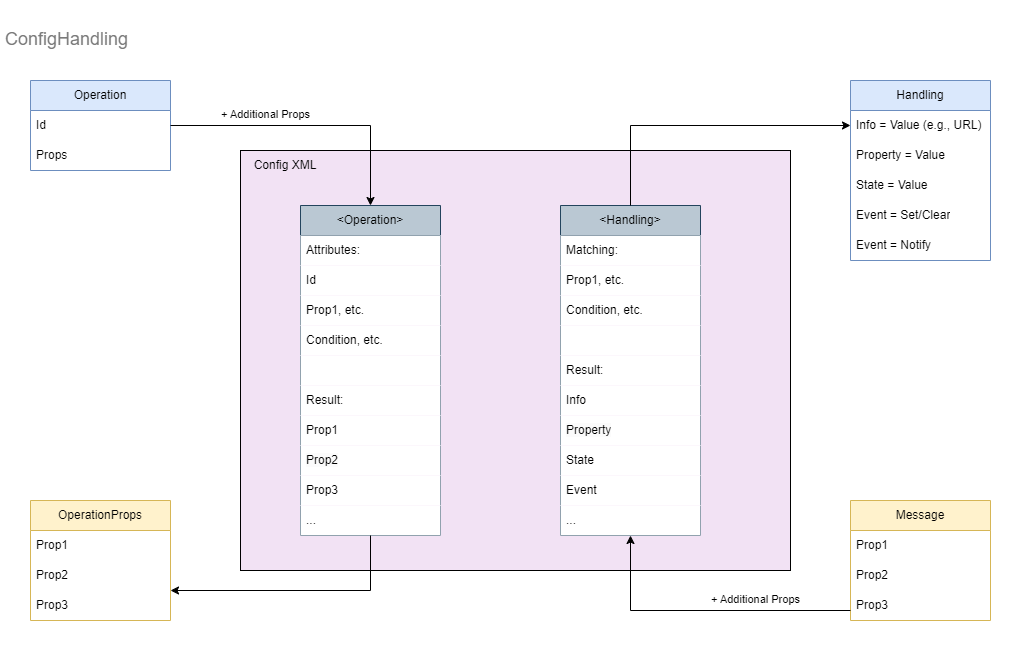
The SDKs provide a generic implementation for such implementations based on an XML file, we refer to this as Config XML. The default name of the file is derived from the name of the module. “MyMod”, for example, uses the Config XML file MyMod.config.xml, etc. This can be customized using the <ConfigDef> definition in the Manifest XML. Alternatively, the XML file can be specified explicitly in the Extension Settings. Since the Config XML is only used to configure the internal behavior of an Extension, it does not require any LNG language resources and is also only used by the Extension, not by WinGuard.
While the Config XML is primarily designed for developer use, experienced technicians may make temporary adjustments to quickly respond to changes in third-party systems or protocols.
However, such modifications should only be made as short-term solutions and must be reported back to the developer immediately. These changes may indicate necessary code modifications to ensure compatibility across all systems and should be properly implemented in future versions of the module.
The content design of a Config XML can vary wildly based on the specific requirements of Extensions. Only the <Settings> section for defining Extension internal Settings always has the same format. In addition, there are the following three different types of sections:
Operation Definitions
Enables the realization of Operations to associated information (properties), such as message code, etc. The default table name of the section is <Operations>. Several of these sections with different names can be used. However, the contained elements must always be named <Operation>. They can only contain <Property> entries.
Handling Definitions
Used to convert message contents (encoded as properties) or corresponding information sets to Handlings with States, Events, Properties and Infos. The default table name of the section is <Handlings>. Several of these sections with different names can be used. However, the contained elements must always be named <Handling>. A <Handling> can contain <Info>, <Property>, <State> and <Event> entries.
Free Items Definitions
Generic sections. Allow arbitrary realizations of properties to a value, which can also be an object or array, or to a set of properties. The contained elements can be arbitrarily named, e.g., <Item> etc. All elements are treated in the same way. The elements can contain either a <value> or a set of <property>.
The way the sections work is basically the same. Each entry can contain any attributes as well as a general “condition” attribute. An entry is selected if all specified attribute values are found in the specified properties and if the specified condition statement matches. With the condition more complex checks of the property values are possible, e.g., condition="code == 5 OR code > 10" (where code is an attribute passed in the query) etc.
The definitions are accessed via different query functions, each of which can have a section name specified:
Props[] GetOperationInfo( Operation, Props[], [SectionName] )
The <Operations> section is used here as default. Only <Operation> entries in the section are considered, and only <Properties> contained there are returned as a result. The properties are aggregated from all matching entries; if the properties are the same, the entries further down overwrite the ones above.
Handling GetHandling( Props[], [SectionName] )
As default the <Handlings> section is used here. Only <Handling> entries in the section are considered, and only <Info>, <Property>, <State> and <Event> contained there are returned. The handing is aggregated from all matching entries, and if the entries are the same, entries further down overwrite those above.
Props[] GetProperties( Props[], SectionName )
For this generic query, the section name must be specified. The name of the entries in the section can be arbitrary. The properties of the matching sections are returned. The properties are aggregated from all matching entries. If the properties are the same, the entries below will overwrite the ones above.
Value GetValue( Props[], SectionName )
For this generic query, the section name must be specified. The name of the entries in the section can be arbitrary. Only the first entry found is taken into account. The value contained there is returned as the result.
All sections are embedded in the root Node <Config>:
<Config>
Root Node of the XML file with four types of sections.
| Description | |
|---|---|
| <Settings> | Container with internal <Setting> definitions of the Extension. The Settings section exists only once and is always called Settings. |
| <Operations> | Default Container with <Operation> definitions for assignment of operations to free properties. The name of the container can optionally be specified in the query (default is “Operations”>, so it can be named differently or multiple Operation sections can be used if needed. |
| <Handlings> | Default Container for <Handling> definitions for assignment of free properties (most of which contain the parsed elements of the received message) to a Handling with Infos (Properties), Properties, States and Events. The Handling can usually be passed directly to the Object store for application to an Object. The Properties, States and Events are applied to the corresponding Object. The info properties can contain, for example, information about the creation of the URL. |
| <Items> | Custom container with individual <Value> or <Property> contents. The type of query also determines how the result is returned. |
<Settings>
Container with a list of <Setting> definitions. Example:
<Settings>
	<Setting id="RestartImmediately" type="bool" value="1" />
	<Setting id="Restart" type="bool" value="true" />
	<Setting id="NoRestart" type="bool" value="false" />
	<Setting id="Ten" type="int" value="10" />
	<Setting id="Pi" type="double" value="3.14" />
	<Setting id="Name" type="string" value="test" />
</Settings>
<Setting>
| Description | |
|---|---|
| id | Symbol Path. This is used to retrieve the Setting. |
| type | An AOP data type. Without specification “string” is used. |
| value | The value of the Setting. Instead of the value attribute, the text of the element can be used to specify the value, i.e., <Setting id=“sample” value=“one”> can also be written <Setting id=“sample”>one</Setting>. |
These are internal Settings of the Extension. They cannot be configured in the UI.
<Operations>
Default Container with a list of <Operation> definitions. The contained properties will be returned as result. Example:
<Operations>
	<Operation id="On" object="Buzzer" condition="ProtocolVersion!=4">  <!-- certain ID and Object + condition  -->
		<Property id="commandcode" value="13" />
		<Property id="executioncode" value="1" />
	</Operation>
	<Operation id="Off" object="Buzzer" condition="ProtocolVersion!=4">  <!-- the same but another ID  -->
		<Property id="commandcode" value="13" />
		<Property id="executioncode" value="2" />
	</Operation>
	<Operation id="Toggle" condition="ProtocolVersion!=4">  <!-- certain ID, any Object, condition  -->
		<Property id="commandcode" value="3" />
		<Property id="executioncode" value="2" />
	</Operation>
	<Operation id="Toggle" condition="ProtocolVersion==4"> <!-- the same but another condition  -->
		<Property id="commandcode" value="13" />
		<Property id="executioncode" value="3" />
	</Operation>
</Operations>
<Operation>
Entry in an Operations section. The specified attributes serve as filters. The contained properties are returned as result.
| Description | |
|---|---|
| id | Symbol Path. The type of the Operation specified for the query is checked here as “Id”. |
| [any other attributes] | These are compared with the specified properties as described above. Both the properties of the Operation and any additionally specified properties are taken into account. |
| condition | Alternatively or additionally a condition statement can be defined here, which uses the specified Operation including properties individually for matching the entry (e.g., "object.address=5 AND daymode=true"). |
| <Property>… | The specified properties are returned as the result if the <operation> entry matches. |
<Property>
| Description | |
|---|---|
| id | Symbol. Property-Id |
| type | Optional property value type. Default is “string”. |
| value | Value of the property. Passed properties can also be returned as values here. These are referenced with ${PropertyName}. |
<Handlings>
Default container with a list of <Handling> definitions. The contained Infos, Properties, States and Events are returned as result. Example:
<Handlings>
	<Handling code="25">  <!-- only Event  -->
		<Event id="Tamper" action="set" />
	</Handling>

	<Handling code="29">   <!-- State and info-property  -->
		<Info id="IsSystemStart" value="1" />
		<State id="SystemStart" value="1" />
	</Handling>

	<Handling code="5005" condition="ProtocolVersion==22"> <!-- code and condition, defines 3x events, 2x States and 2x properties  -->
		<Event id="test_passed" action="set">
			<Property id="section" value="Messages"/>
		</Event>
		<Event id="test_failed" action="clear" />
		<Event id="test_performed" action="notify"> <!-- notify is the default action, it could be left out -->
			<Property id="file" value="config.xml"/>
			<Property id="time" value="now"/>
			<Resource id="EventImage" type="data" kind="image/jpeg" />
		</Event>
		<State id="A" value="3"/>
		<State id="B" value="4"/>
		<Property id="D" value="6"/>
		<Property id="E" value="7"/>
	</Handling>
</Handlings>
<Handling>
Entry in a Handling section. The specified attributes serve as filters. The contained Infos, Properties, States and Events are returned as Handling.
| Description | |
|---|---|
| [any attributes] | These can be freely defined by the Extension according to the protocol, etc. The Handling entry is selected via the attributes. |
| condition | Alternatively or additionally a condition statement can be defined here which uses the specified properties for matching the entry (e.g., "type=1 AND address>5"). |
| <Info> | An information as property with id and value. For example url can be returned here or information with regard to the creation of the URL.💡Infos are for internal use of Extension, are not set at the Object when applying the Handling. |
| <Property> | Defines the Setting of a property with id, optional type and value.💡An indicated Property is set at the Object in this form. Specifying the correct type is recommended. |
| <State> | Defines the Setting of a State with id, optional type and value. A Value=null will remove the State.💡An indicated State is set at the Object in this form. Specifying the correct type is recommended. |
| <Event> | In the Event definition, the attribute action determines whether this Event is to be set (=set), deleted (=clear) or simply notified (=notifiy). The id here refers to the “id” of the Event defined in the module XML. The optional attribute key is the unique identifier if several Events of the same type are present at the same time or if certain Events are to be uniquely identified as an instance. Properties and resources can also be specified within the Event if the Event possesses them. |
💡For definition values for <Info>, <Property>, <State> and <Event> the properties handed over can be used with ${PropertyName} respectively.
<Info>
| Description | |
|---|---|
| id | Symbol. Property ID |
| type | Optional property value type. Default is “string”. |
| value | Value of the info property. Transferred properties can also be returned as values here. These are referenced with ${PropertyName}. |
<Property>
| Description | |
|---|---|
| id | Symbol. Property ID |
| type | Optional property value type. Default is “string”. 💡The Extension implements its model, but does not know or use the Ext.module.xml. The indication of the correct type is recommended so that the Properties will be stored at the Object in the intended way. |
| value | Value of the info property. Transferred properties can also be returned as values here. These are referenced with ${PropertyName}. |
<State>
| Description | |
|---|---|
| id | Symbol. State ID |
| type | Optional State value type. Default is “string”. 💡The Extension implements its model, but does not know and use the Ext.module.xml. The specification of the correct type is therefore necessary, e.g., to enable a correct evaluation of conditions based on it. |
| time | (optional) The time can be set from a transferred property if required. |
| iotag | (optional) The IOTag can be initialized from a transferred property if required. The IOTag is always created in the Extension. |
| value | Value of the State. Transferred properties can be returned as value here. These are referenced with ${PropertyName}. |
<Event>
| Description | |
|---|---|
| id | Symbol. Declares the Event type. Usually references an Event definition from the module XML. |
| key | (optional) If Events of the same type are to be distinguished for the same Object, the key uniquely identifies them in this context. If no key is given, the type will be used as key. |
| time | (optional) The time can be set from a passed property. For “set” it is the start time, for “clear” the end time and for “notify” the time of occurrence. |
| iotag | (optional) The IOTag can be initialized from a transferred property if required. The IOTag is always created in the Extension. |
| action | (optional) “set”, “clear” or “notify”. Default is “notify”. |
| <Property>… | (optional) Properties belonging to the Event. |
| <Resource>… | (optional) Additional resources for the Event. |
<Resource>
| Description | |
|---|---|
| id | Symbol. ID of the Event Property that is marked as a resource. |
| method | (optional) “get” or “put”. Default is “get” |
| type | (optional) Value type of the resource. Possible values “bool”, “int”, “float”, “string”, “guid”, “time”, “data” and “object”. [] specifies an array. Default is “data”. |
| kind | (optional ) Specification regarding the type, mostly a mime type e.g., “image/jpeg” or “audio/wav”. Mandatory for type “data”. |
| url | Unique Id of the resource. The URL can be used to retrieve the resource or to identify it during the “put”. |
| <Property>… | (optional) Properties that might be required to retrieve the resource. |
<Items>
When writing a module, it is sometimes necessary to create tables on which the logic of the module is based. These tables should not be hard-coded so that they can be customized without recompiling. With user-defined sections, Config XML provides the ability to collect and query arbitrary data in such tables.
The user-defined sections are built basically the same way as the predefined sections described above: an element with the name of the section contains the entries. Each entry is an XML element with any name (but it is recommended that the elements always have the same name in singular, and the section name is this name in plural (e.g., <Items> … <Item/> … <Item/> … <Item/> … </Items>).
Example:
<CountryCodes>
	<CountryCode country="de">
		<Value type="string" value="+49"/>
	</CountryCode>
	<CountryCode country="es">
		<Value value="+34"/>  <!-- default type is string -->
	</CountryCode>
	<CountryCode country="it">
		<Value>+39</Value>   <!--  text is used instead of attribute value -->
	</CountryCode>
</CountryCodes>
Another example that shows the different possibilities for use:
<!-- user defined section -->
<Examples>
	<!-- name of subitems does not matter, it can be Record or something else, attributes are used to find right item -->
	<Example id="MyEmpty" />  <!-- Null is returned -->
	<Example id="MyInteger">
		<!-- only one top element is allowed (here: Value) -->
		<Value type="int" value="12345"/>
	</Example>

	<Example id="MyString">
		<Value type="string" value="OK"/>
	</Example>

	<Example id="MyString2">
		<Value>OK-2</Value>
	</Example>

	<Example id="MyObject" condition="simple==true">
		<!-- only one value element is allowed -->
		<Value type="object">
			<Property id="name">Simple</Property>
			<Property id="description">Simple Object</Property>
		</Object>
	</Example>

	<Example id="MyArray" condition="simple==true">
		<!-- only one top element is allowed (here: Array) -->
		<Value type="[]"> <!-- an array, default is string -->
			<Value>one</Value>
			<Value>two</Value>
		</Value>
	</Example>

	<Example id="MyObject" condition="simple==false">
		<!-- type object will be returned on request with GetValue(), GetProps() will return nothing-->
		<Value type="object">
			<Property id="name" type="string" value="MyObject"/>
			<Property id="props" type="object">
				<!-- type object does not have value but subitems that are properties of this object -->
				<Property id="time" type="string" value="today"/>
				<Property id="description" value="default type is string"/>
				<Property id="tag">text</Property>
			</Property>
			<Property id="ints" type="array">
				<!-- type array does not have value but items -->
				<Item type="int" value="1"/>
				<Item type="int">2</Item>
				<Item type="int">3</Item>
			</Property>
		</Value>
	</Example>

	<Example id="MyObject2" condition="simple==false">
		<!-- type object will be returned on request with GetValue(), AdvProps on request with GetProps() -->
		<Property id="time" type="string" value="today"/>
		<Property id="description" value="default type is string"/>
		<Property id="tag">text</Property>
		<Property id="strings" type="array">
			<Value type="int">1</Value>
			<Value type="int">2</Value>
		</Property>
	</Example>
</Examples>
<Item>
| Description | |
|---|---|
| [any attributes] | The attributes are used to select the entry in connection with the properties transferred upon the query. |
| condition | Alternatively or additionally, a condition statement can be defined here which uses the specified Operation including properties individually for matching the entry (e.g., "mode=5 AND daymode=true"). |
| <Value>… | Only the first specified value will be returned as result when querying with GetValue() if the <operation> item matches. Instead of embedding the value as an element, it can also be specified directly as text of the <Item> element, e.g., <Item id="5">MyValue</Item>. |
| <Property>… | The indicated properties are returned as a result when the GetProps() section is queried. |
<Value>
| Description | |
|---|---|
| type | Optional value type, can also be “object” or an array type, e.g., “string[]”. Default is “string”. |
| value | Value of the property. Instead of this attribute, the value can also be transferred as text of the element, <Value type="int">1</Value> Here also passed properties can be returned as value. These are referenced in each case with ${PropertyName}. For “object” and array types the value is not defined as attribute, but by the following elements: |
| <Value> | If the value is a value array, the values are defined inside. |
| <Property>… | If the value is an Object, the Properties are defined inside. If property is an Object, its Properties are again defined inside, and so on. |
Merging with Config XML from custom folders
The Config XML can either be located in the installation folder or the custom folder of the Extension. It is even possible to have a Config XML in both locations so they can be merged together. If a container from the Config XML of the custom folder matches with one from the definition of the installation folder, it will simply replace the latter one. The following example shows how a container would look like after merging.
Installation folder:
<SSTConfig>
	<Settings>
		<Setting id="SettingBool0" type="bool" value="0" />
		<Setting id="SettingBool1" type="bool" value="1" />
	</Settings>
	<Operations>
		<Operation id="On" object="Buzzer" condition="ProtocolVersion==3">
			<Property id="commandcode" value="14" />
			<Property id="executioncode" value="1" />
			<Property id="default" value="24" />
		</Operation>
	</Operations>
</SSTConfig>
Custom folder:
<SSTConfig>
	<Operations>
		<Operation id="On" object="Buzzer" condition="ProtocolVersion==3">
			<Property id="commandcode" value="12" />
			<Property id="executioncode" value="12" />
			<Property id="custom" value="1" />
		</Operation>
		<Operation id="On" object="Buzzer" condition="ProtocolVersion==5">
			<Property id="custom" value="5" />
		</Operation>
	</Operations>
</SSTConfig>
Resulting merged Config XML:
<SSTConfig>
	<Settings>
		<Setting id="SettingBool0" type="bool" value="0" />
		<Setting id="SettingBool1" type="bool" value="1" />
	</Settings>
	<Operations>
		<Operation id="On" object="Buzzer" condition="ProtocolVersion==3">
			<Property id="commandcode" value="12" />
			<Property id="executioncode" value="12" />
			<Property id="custom" value="1" />
		</Operation>
		<Operation id="On" object="Buzzer" condition="ProtocolVersion==5">
			<Property id="custom" value="5" />
		</Operation>
	</Operations>
</SSTConfig>
Order of definitions
A user can define multiple containers with different conditions, which can match for a single Object. For example:
<SSTConfig>
	<Operations>
		<Operation id="On" object="Buzzer" condition="ProtocolVersion==3 or ProtocolVersion==4">
			<Property id="commandcode" value="15" />
		</Operation>
		<Operation id="On" object="Buzzer" condition="ProtocolVersion==3  or ProtocolVersion==5">
			<Property id="executioncode" value="12" />
			<Property id="commandcode" value="12" />
		</Operation>
		<Operation id="On" object="Buzzer" condition="ProtocolVersion==3">
			<Property id="custom" value="1" />
		</Operation>
	</Operations>
</SSTConfig>
The resulting properties for an Operation with {id=On, object=Buzzer, ProtocolVersion=3} would be {executioncode=12, commandcode=12, custom=1}. That means that containers are evaluated in a top down order and the properties of the last matching one are applied on top of the previous ones.
Selection behavior and expressions
- All string comparisons for the selection of an Object are case-sensitive.
- Numerical values are compared as such, i.e.,
value="3"is the same asvalue="3.0"