Settings
Overview
Almost every application has settings that can be used to configure the application and control its behavior.
AOP provides a general mechanism for managing such settings, and for defining and using them flexibly.
The base principle of every setting is that a value is assigned to a specific key that identifies the setting.
Here are some random setting examples:
| Key | Value |
|---|---|
| Language | en |
| HostAddress | 10.0.1.10 |
| AlarmColor | #FF0000 |
| AutoSaveOnExit | true |
| QueryOnDeletion | false |
Let’s now take a look at an example of a networked AOP application structure:
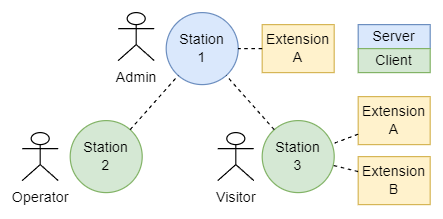
It quickly becomes clear that we cannot simply define such settings from above globally, but that we may want to define them per station or per user and perhaps even for a combination of both. AOP uses Targets for this, as described below.
Another aspect is that Extensions will also have settings. These may conflict with application settings or settings of other Extensions. To counteract this, AOP uses the Origin to allow Extensions to define their own custom settings space.
The settings definitions are managed as individual Data Objects which can be accessed via the Settings Service. A setting object is defined as follows:
There can be several definitions with different targets for a key. The service therefore also has functions for querying the effective settings for a specific context. Similar functions with implicit context are available for the ext.settings and app.settings services.
Below is an explanation of how the evaluation of the effective settings is carried out for such a context.
Generic editing of settings is enabled in a similar way to Data Objects. Each setting is described in detail with its value type, data type and input options, similar to a Data Object Property. Furthermore, the structure for the user interface is defined based on this using data forms.
The syntax is described as ADL definitions.
Targets
Each setting definition contains a target specification. This determines the context in which the setting is to be used. The following target specifications are possible:
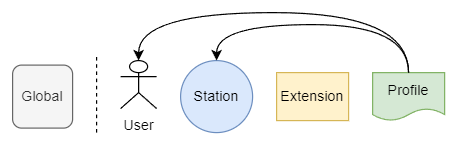
User, station and extension are the main targets for different settings configurations. A single entry or a combination of these is possible, e.g. User, User + Station, Station + Extension etc.
Profiles as abstract targets are used to define settings for a group of users or a group of stations and can replace these individual target specifications.
If no target is specified at all, this is a global definition.
Regardless of the origin, the target definitions always have the same meaning. For settings from an Extension, the Extension will therefore usually be specified as origin and also as target.
Not every target can be specified for every setting, but the possible targets are configured in each case.
Origin
The origin specifies the source of a setting and thus forms a kind of namespace to ensure the clear meaning of keys across core application and Extensions.
If no origin is specified, this is a core application setting. Such settings may be used directly by any Extension. If an Extension brings custom settings, these are identified by the origin specification and can only be used by this Extension.
An Extension itself must ensure that the keys it uses (custom settings + application settings used) are unique overall.
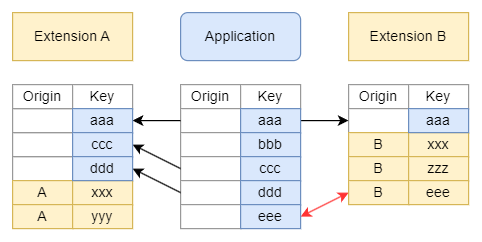
If the Extension uses the same key for a custom setting as an already existing application setting (here ’eee’), this is not a problem, but the application setting can then no longer be used by that Extension.
If a settings value query is made for an origin, all settings of the corresponding Extension are returned, custom settings and included application settings. The result set is determined by the configuration files of the Extension.
Evaluation
As described above, there can be several definitions with different target specifications for the same setting key. The definition to be used for a given context is determined in the following way:
- The targets contained in the context are taken into account.
- Only definitions whose targets are fully present in the context are considered.
- The definition with the largest number of targets is used.
- If there are several definitions with the same number of targets, the one that contains target with the highest priority is used.
- If there are several definitions with the same highest target type priority, the defined sequence of these targets in the application is used.
- If there is no definition at all with matching targets, the global definition is used, and if this is not available either, the default value is used, which is configured for each setting.
In principle, each application can handle the prioritization of targets in its own way. However, the following sequence is recommended and also implemented for WinGuard:
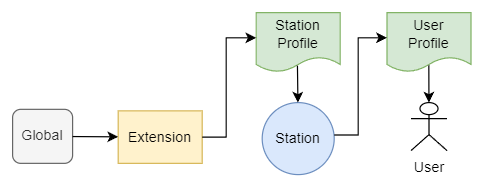
This means that a user setting has the highest priority and overwrites a user profile setting, which in turn overwrites a station setting and so on down to the global setting with the lowest priority.
Editing
The available settings of an AOP application can be queried as special type “Settings”. The properties of this object describe the possible settings of the application.
The form for editing the settings can be queried accordingly as form object “Settings”. The possibility of overwriting settings for certain targets must be taken into account on the client sides implementation.