Websocket IPC
The preferred way for components to link with an AOP Node is Websocket IPC.
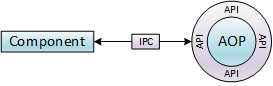
IPC stands for Inter Process Communication. AOP’s Websocket IPC follows a semantic similar to JSON-RPC 2.0.
It uses the standard Websocket-Protocol for data transport.
Connection ≥aop 0.4.1
The connection is established in two steps:
- Send an HTTP GET request to the AOP main port (default 1234) at the /connect endpoint (e.g.
https://localhost:1234/connect). - Create a WebSocket connection with the URL returned by that GET request.
HTTP request
AOP expects the following HTTP headers to be set in order to authenticate and authorize the connection.
| Header | Type | Required | Description |
|---|---|---|---|
| token | string | Yes | Json Web Token (JWT) to identify and authorize this client. See Token below for additional details. |
| license | string | Yes | Base64-encoded LIC file. |
| skills | string | No | Base64-encoded SkillInfo. Used to override the skill information in the manifest. Required if the extension offers no manifest. |
Successful response
If the authentication was successful, the server will respond with HTTP status code 200 and an application/json payload containing the following information.
| Field | Type | Description |
|---|---|---|
| ws_connect_uri | string | This is the URI for the following WebSocket request. It already contains all necessary parameters. |
| client | string | This is the client ID that AOP has assigned to your connection. |
| session | string | This is the session ID that AOP has assigned to your connection. Used for HTTP based out of band transfers. |
| skills | SkillVersion[] | Lists the negotiated skills with their respective version (as SkillVersion objects) that are used for this connection. |
Notes:
- The
clientfield usually contains the same value as the “cid” field of the JWT provided in the request. However, for some clients, such as Extensions with the “multiclient” trait, theclientfield will contain a generated value to avoid collisions. - Skills that are provided by the Extension do not appear in the skill negotiation result in the
skillsfield, as there is no specific version being negotiated for those. Instead, an Extension is required to support all implemented skill versions simultaneously (i.e. being able to handle incoming function calls each according to different skill versions depending on the source of the function call). In practice, it is currently recommended to only suppoprt one specific version of a provided skill.
Example response:
{
 "ws_connect_uri": "wss://my-winguard:1234/deferred_connect/123456789",
 "client": "demopanel",
 "session": "1234123213",
 "skills": [
  {
   "skill": "wg",
   "version": "0.1.2",
  },
  {
   "skill": "wg.core",
   "version": "0.0.8",
  }
 ],
}
Error response
In case of an error, the server will respond with HTTP status code of 403 (Forbidden) and an application/json payload containing an Error object.
Possible errors:
| Error Id | Message | Data |
|---|---|---|
| Call.Param.Missing | Missing license | Param: license |
| Call.Param.Value | Malformed license | Param: license |
| Call.Param.Value | Unsigned license or invalid signature | Param: license |
| Call.Param.Missing | Missing JWT | Param: token |
| Call.Param.Missing | JWT missing oat field | Param: token.oat |
| Call.Param.Missing | JWT missing jti field | Param: token.jti |
| Call.Param.Missing | JWT missing iat field | Param: token.iat |
| Call.Param.Value | Malformed JWT | Param: token |
| Call.Param.Value | Invalid cid in JWT | Param: token |
| Call.Param.Value | Unsigned JWT or invalid signature | Param: token |
| Connect.JwtExpired | JWT expired | |
| Connect.JwtAlreadyUsed | JWT already used | |
| Connect.InvalidUser | Invalid user | |
| Connect.InvalidGrant | Invalid authorization grant | |
| Connect.UnlicensedModule | Module not found in system license | |
| Connect.TooManyConnections | Too many connections for module in system license | |
| Connect.SkillNegotiationFailed | Required/Provided skills are incompatible | Skills: Map of skills for which the negotiation failed with their respective supported versions. |
| Connect.InvalidClient | Invalid client | |
| Connect.IdentityProviderUnavailable | Required identity provider extension is not available right now |
For example if the client requested the skills “wg” in version 0.5.0 and “myskill” in 1.0.0, the server might respond with a Connect.SkillNegotiationFailed error with the following content:
{
  "skills":
  {
    "wg": ["0.4.4", "0.4.5", "0.4.6"], // the versions that are supported by the server for this skill
    "myskill": [] // not supported at all by the server
  }
}
WebSocket upgrade request
If the HTTP GET request was successful, a WebSocket connection can be established with the URI returned by the HTTP GET response. The Websocket-Protocol (Sec-WebSocket-Protocol header) has to be set to aop.ipc.
In case of an error, the server will respond with a HTTP staus code !=200. Possible errors include:
- The URI used for the HTTP upgrade request is no longer valid.
- Server responds with status code 403 (Forbidden).
- Solution: The client must attempt the upgrade request immediately after receiving the connect URI from the server.
- The client included one or multiple of the HTTP header fields reserved for the initial connect request in the HTTP upgrade request.
- Server responds with status code 403 (Forbidden).
- Solution: The client must provide these headers only in the initial connect request.
- The client used the wrong WebSocket sub-protocol.
- Server responds with status code 404 (Not Found) if the specified sub-protocol is unknown. Otherwise, the status code is unspecified.
- Solution: The client must use
aop.ipcas the sub-protocol.
Token
The token used to authenticate and authorize new connections is a signed JSON Web Token according to RFC 7519.
It is expected that clients provide such a token upon creating a connection. Among other meta data, the JWT encapsulates an access token which is used to authorize the specific connection attempt.
In case of components that are started by the AOP App itself, a valid access token is provided beforehand by the App, e.g., by passing it by command line or sending it within the HTML content in Browser scenarios. Other components must use an access token statically assigned by the AOP App for the specific Extension, or obtain a valid access token by performing the steps described in Authorization.
Every access token is unique and, with the exception of static access tokens, may only be used to establish a connection once. Reconnecting then requires a new access token.
Token structure
The header consists of the following fields:
| Field | Description |
|---|---|
| alg | The algorithm used for signing this token. |
| typ | Always JWT. |
If a client creates the token itself, it can choose between these algorithms:
HS256HMAC with SHA-256.RS256RSASSA-PKCS1 with SHA-256.noneUnsigned, only to be used in Special Cases.
The signature has to be created with the same secret that is stored within the license file and that matches the client’s app ID.
The payload consists of the following fields:
| Field | Description |
|---|---|
| cid | Client ID, this is the Extension code as configured within WinGuard to identify the client. |
| iat | Issued at, this is the unix timestamp (seconds since 01.01.1970 0:00 UTC) and is used to describe the age of a token. Tokens have a limited lifetime. |
| jti | JWT ID, a guid that identifies a token uniquely. Two tokens can’t have the same guid or access will be denied. |
| oat | OAuth access token. See Token and Authorization for details on how to obtain this access token. |
SkillInfo
The SkillInfo object contains information about which skills and versions a client requires from the host and which ones it supplies itself. Using the “skills” header, a set of matching skills is brokered between the host and client and returned in the response (see HTTP request).
| Name | Type | Required | Description |
|---|---|---|---|
| Required | SkillVersions[] | Yes | Required skills. If a required skill can’t be provided by the host in the requested version, the connection won’t be established. |
| Optional | SkillVersions[] | No | Optional skills. If an optional skill can’t be provided by the host, the connection will still be established, but the optional skill(s) will be missing and can’t be used. |
| Provided | SkillVersions[] | No | If the client provides (implements) skills, they are listed here. If more than one version per skill is provided, all versions need to be supported by the client in parallel. |
SkillVersions
| Name | Type | Required | Description |
|---|---|---|---|
| Skill | string | Yes | Name of the skill. |
| Versions | string[] | Yes, at least one entry | Array of versions that are supported by the requesting client. Uses Semantic Versioning 2.0. |
SkillVersion
| Name | Type | Required | Description |
|---|---|---|---|
| Skill | string | Yes | Name of the skill. |
| Version | string | Yes | Version of the skill that was negotiated for the connection. Uses Semantic Versioning 2.0. |
Special cases
As described above, the Http Request requires both a license as well as a correspondingly signed JWT.
There is however a single exception to this rule: Extensions of type “API” are designed to work without a module license in order to provide fast and easy API access. For those extensions, only the JWT’s “oat” and “cid” claims are matched against the configured Extension in WinGuard. The “alg” claim should be set to none.
Connection (deprecated)
While it is still possible to connect directly via WebSocket right now, this way of connecting will be removed in the future, so please use the new connect method described above.
The connection is established by creating a Websocket connection to the
AOP main port (default 1234). The Websocket-Protocol (Sec-WebSocket-Protocol header) has to be set to aop.ipc.
Additionally, AOP expects the following HTTP headers to be set to authenticate and authorize the connection.
| Header | Type | Required | Description |
|---|---|---|---|
| token | string | Yes | Json Web Token (JWT) to identify and authorize this client. See Token below for additional details. |
| license | string | Yes | Base64-encoded LIC file. |
| session | string | No | Sets the session ID to use for out of band transfers over HTTP (e.g. resources). This is mainly useful for clients that can’t handle response headers inside websocket upgrade requests. |
| skills ≥aop 0.4.1 | string | No | Base64-encoded SkillInfo. Used to override the skill information in the manifest. Required if the extension offers no manifest. |
💡If the Websocket library in use does not support adding custom headers (e.g. inside a Browser) these headers can also be provided as URL encoded parameters instead.
The server will respond with one of the following HTTP status codes:
| Code | Description |
|---|---|
| 101 | Authentication successful, server will switch to the AOP Websocket IPC sub-protocol. |
| 403 | Error during authorization. |
| 416 | Functions or protocol version requested by the client are not available. |
Additionally, the following HTTP response headers will be sent:
| Header | Type | Description |
|---|---|---|
| session | string | Session ID, that has to be used for HTTP based out of band transfers. If the session header was provided this value is identical to the one sent on establishing the connection. |
| client | string | (Optional) If a client has multiple connections using the same Extension code and the module is marked as a multi client module WinGuard will assign new and unique client ids for every additional connection made. |
| skills ≥aop 0.4.1 | string | Base64-encoded list of negotiated skills with their respective version (as SkillVersion objects) that are used for this connection. |
Communication
Basically, two processes communicate with each other by exchanging JSON objects.
sequenceDiagram
    Process 1 (Component)->>+Process 2 (AOP): Request {...}
    activate Process 2 (AOP)
    opt Function Call
    Process 2 (AOP)-->>Process 1 (Component): Result {...}
    end
    deactivate Process 2 (AOP)
    Process 2 (AOP)->>+Process 1 (Component): Request {...}
    activate Process 1 (Component)
    opt Function Call
    Process 1 (Component)-->>Process 2 (AOP): Result {...}
    end
    deactivate Process 1 (Component)
The Component (Process 1) communicates with AOP (Process 2) by sending Requests, which may represent calls of functions provided by the API or notifications, triggered by the component.
All communication is bidirectional, so AOP can also call functions provided by the Component, even at the same time it is answering a function call of the Component.
Results are only sent for function calls.
Function calls
A function is called by sending a Request object with the following attributes:
| Property | Type | Description |
|---|---|---|
| method | string | Symbol Path. Name of the function to call. |
| params | object | (Optional) List of named parameters (if any). |
| id | string | Arbitrary ID given by the caller to identify the result of the function call. |
| client | string | (Optional) ID of the Extension which should handle the request. |
| session | string | (Optional) Session ID that is associated with the caller. This is set by an AOP server and never by a client itself. |
{
  "method": "myFunction",
  "params": {
    "param1": "value",
    "param2": 2
  },
  "id": "0d4ef7d2-fc81-45ca-baaf-6a6b155e3c85",
  "client": "core",
  "session": "arbitrary-value-sent-here"
}
In case of a successful call, the callee will respond with the following Result object:
| Property | Type | Description |
|---|---|---|
| id | string | The ID given by the caller when making the call. |
| result | unspecified | (Optional) Result, the type depends on the call made and can be an array, object, number, string and so on. If a function does not have a result this field is omitted. |
{
  "id": "0d4ef7d2-fc81-45ca-baaf-6a6b155e3c85",
  "result": "a value"
}
If for any reason the call failed, the following Error message is sent instead. An Error message may also be sent not in response to a call for other protocol-related issues.
| Property | Type | Description |
|---|---|---|
| id | string | (Optional) The ID given by the caller when making the call. If the call object was malformed and failed to include a valid ID or if the error was raised not in response to a call, this field is omitted. |
| error | Error | An error object describing the error that occurred, see below. |
Error
| Property | Type | Description |
|---|---|---|
| id | string | Symbol Path. Application specific ID of the error. |
| message | string | (Optional) A textual representation of the error in english language that gives an extended explanation of the problem. |
| data | object | (Optional) An error specific object which might include additional data concerning the error. |
{
  "id": "0d4ef7d2-fc81-45ca-baaf-6a6b155e3c85",
  "error": {
    "id": "aop.error.sample",
    "message": "This is a sample error message!",
    "data": {
      "env": "dev",
      "user": "admin"
    }
  }
}
Every function call is inherently asynchronous, so calling functions A, B, C and D does not guarantee that the callee will respond or even process them in their call order.
If processing order is relevant, it is the caller’s responsibility to ensure synchronization. This is usually done by waiting for the result of a function call before calling the next one.
Notifications
A notification is triggered by sending a Request object with following attributes:
| Property | Type | Description |
|---|---|---|
| method | string | Symbol Path. Name of the notification. |
| params | object | (Optional) List of named params (if any). |
| client | string | (Optional) ID of the Extension which should handle the request. |
| session | string | (Optional) Session ID that is associated with the caller. This is set by an AOP server and never by a client itself. |
{
  "method": "myNotification",
  "params": {
    "param1": "value",
  },
  "client": "core",
  "session": "arbitrary-value-sent-here"
}
Notifications are similar to function calls but instead of a one-to-one relation between caller and callee they are implementing a one-to-many semantic between a notifier and an arbitrary amount of subscribers.
Notifications never return a result and thus the call itself neither has an ID nor can it be detected if the notification was handled. Their delivery should be seen as best effort.