Rights
Overview
AOP offers flexible rights management, which can roughly be described as a combination of policy-based access control (PBAC) and role-based access control (RBAC).
Let’s first take a look at the basic situation of an application. On the one hand, there are things like Objects, functions and other resources that you may want to restrict access to, we call them items. On the other hand, there are possible actions on such items that we may want to restrict.
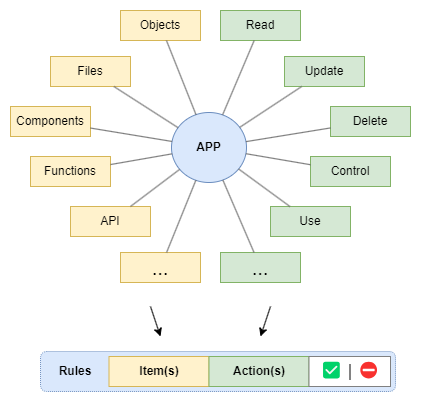
All permissions in AOP are defined on this basis as rules whereby each rule allows or prohibits the execution of certain actions for certain items.
The items for such rules are selected via attributes, whereby it is also possible to include only partial aspects of items, such as certain Properties of an Object or certain services of the API, etc.
Each application has its own specific items and actions, but the principle of the rules is always the same. Here are some example rules.
| Item(s) | Action(s) | State |
|---|---|---|
| Datapoint | Read, Update, Delete | ✅ |
| Datapoint (fire) | Control | ⛔ |
| Person (phone) | Update | ✅ |
| Files (*.dwg) | Read, Print | ✅ |
| System | SwitchOff | ⛔ |
Let’s now take a look at a structural example of an AOP application:
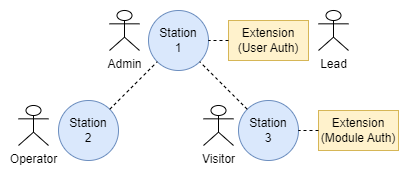
It is obvious that different rules should apply to different users, but we may also want to define rules for stations or connected Extensions. AOP makes this possible using the concept of targets.
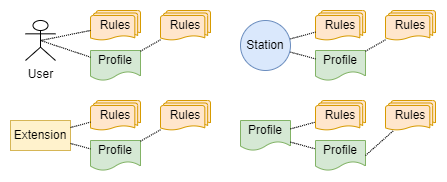
Possible targets are user, station, extension and profile. Profiles serve as a universal tool for structuring rights management and enabling a role-based approach.
The entire rights configuration actually consists of such individual definitions of one rule each for a target, which are referred to as a policy:

The policy definitions are managed as individual Data Objects which can be accessed via the Rights Service. To enable flexible rights definitions even with several targets involved, policies can optionally be weighted.
While the editing of rights is carried out granularly via the modification of individual policy objects, for the evaluation only the rules to be applied for a specific context of targets are required.
Rules
A rule allows or forbids the execution of certain actions for certain items and is defined as follows.
Targets
Rules are defined for targets. The following targets are available:
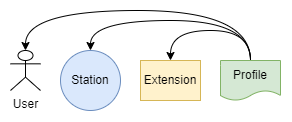
User, station and extension are the actual targets for rules.
Profiles as abstract targets are used to allow group definitions. They serve as a universal tool for structuring rights management and enabling a role-based approach.
A target is specified as follows.
Policies
Policies are the basic building block of the rights definition and each defines a rule for a target with an optional weight.
The policy definitions are managed as Data Objects which can be accessed via the Rights Service. A policy object is defined as follows.
Evaluation
To determine the permissions, first all the targets involved in a given situation are identified and all their rules are put in order. Rules with a higher weight are placed above rules with a lower weight; prohibitions are placed on the same level above permissions:
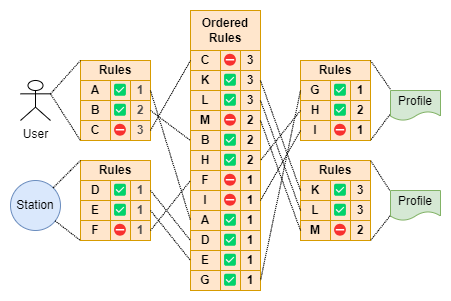
The list of rules ordered in this way can then be scanned through from top to bottom for the permission check for a specific request; the first applicable rule always indicates whether you have a permission or a ban. If no rule in the list applies, you have a ban. However if no rule is defined at all everything is permitted.
A permission request can be made with different levels of detail. For example, only with the item type, or with a specified set of items determined by a filter, or even only for certain aspects of the specified items. Regardless of this, a rule is always applied if all the definitions in the rule apply to the permission request. This approach always leads to the correct result.
Using the Rights Service, you have the option of either querying individual permissions or querying the complete ordered list of rules for a specific target set and then carrying out the checks locally.